Universal Concepts - Navigation - UNITAF Force Manual (FM)


FM/C63 - Universal Concepts - Navigation
The FM outlines our core skills, policies and guides to ensure every member stands ready for the mission ahead.


FM/G96 - Map & Compass

FM/BG-480 - How to read a map

The main thing to remember is that the grids must be read right, and then up. Due to the fact that the map grid is composed entirely of numbers, it's important that you do not transpose them, else you're likely to send someone far, far away from where you needed them to go.

Read the x (horizontal) axis first, then read the y (vertical) axis

Above: Read the x (horizontal) axis first, then read the y (vertical) axis

FM/BS-476 - Read a six-figure grid reference
  • State the proword “GRID”
  • Read the first three digits representing west to east (X Axis)
  • Pause briefly
  • Read the next three digits representing south to north (Y Axis)
FM/BS-477 - Read an eight-figure grid reference
  • State the proword “GRID”
  • Read the first four digits representing west to east (X Axis)
  • Pause briefly
  • Read the next four digits representing south to north (Y Axis)
FM/BS-478 - Recognise points of elevation & hill numbers

Recognise points of elevation and hill numbers:

  • 2 or 3-digit numbers on the tops of hills are known as hill numbers and should be referenced as ‘Hill xxx’
  • The zoom scale of the map affects whether some of these numbers are visible (specifically the smaller/minor hills).
  • In mountainous or hilly terrain there may be multiple hills with the same number. In these circumstances, provide additional context, such as a grid reference to ensure clarity of communication.
FM/BS-479 - Read contours intervals

Read contour lines using the 2 types contour intervals marked on map:

  • Thinner brown lines representing the places of same height at the minor interval (listed in the map legend)
  • Thicker brown or red lines representing places of same height at the major interval level (5 times the minor interval)

Recognize the gradient (steepness) of the terrain, based on the spread of the contour lines (the closer contour lines are, the steeper the terrain)

FM/G83 - Distance estimation

FM/BG-520 - Milliradians: Definition

‘These are small. But the ones out there are far away.’

Give yourself a thumbs-up and hold it out at arm’s length. Congratulations! You’ve just measured two degrees of arc with the width of your thumb. Now raise your hand and hold it out at arm’s length. Spread your fingers all the way. Brilliant! With the span between the tip of your thumb and pinky, you have measured 300 milliradians.

Degrees of arc, the kind you use routinely from your compass, are relatively imprecise compared to milliradians, mrad or mils. Remember, the width of your thumb is already one or two degrees. You can’t easily go smaller without chopping your body to bits for MOA, minutes of arc.

The width of a finger in mrad is closer to 20 to 30.

More specifically, where a circle is 360°, it is also 6400 mrad. This gives us a conversion factor of 17.77, or close enough 18. You can be 18 times more precise using mrad than degrees! This is why we use them for marksmanship and artillery.

Your real-world hands are great tools for remarkably reliable rule-of-thumb estimations. In Arma, much more accurate (and immediately usable) tools to measure mils include your compass, binoculars, rifle optics and spotting scopes.

US Army FM 6-30, Chapter 32

Above: US Army FM 6-30, Chapter 32

FM/BG-521 - Milliradians: Apparent Size

The apparent size of an object changes with distance, as we see daily. The width of your index finger may be a couple centimetres. Move it close to your eye and you can block your whole vision out of it. Move it further away and it occupies a small fraction of your field of view. All the while, the absolute width of your index finger has never changed.

Because our field of view is described by an angle, the area we can see increases with distance. As an object moves farther away, its real-world size doesn't change, but its apparent proportion of our field of view becomes smaller and smaller. This proportion of an angle is also an angle and we can describe it with milliradians.

A metre is always a metre, but we can measure its apparent size to us in milliradians, so we can tell what a metre is at any distance.

If you know how far an object is and measure the milliradians between it and another point, you know the distance between them.

Similarly, if you know the real size of an object, you can use its apparent size to calculate the distance to it. We can do this with surprising accuracy and very little effort using the mil-relation formula.

1 metre cube appearance at different ranges

Above: 1 metre cube appearance at different ranges

FM/BG-522 - Milliradians: Mil-relation formula

‘At 1000 metres, 1 mil is 1 metre.’

This relationship is the key to acquiring ranges quickly and accurately. Just like you know now how many milliradians are in different shapes of your hand, you can remember the real size of different objects, then use milliradians to get ranges from them.

Remember our finger (known size) appeared bigger (milliradians) the closer we held it to our eye, but always the same moved side to side. Therefore: 1 metre (known size) will always appear as 1 milliradian at a distance of 1000 metres.

That same metre will appear as 2 milliradians at a distance of 500 metres. Then again 4 mrad at 250, 5 mrad at 200, 10 mrad at 100 metres. Note how the distance halves for every further factor of 2 mrad. What would be the distance to that 1-metre object when measured 8 mrad?

So if you can remember different ‘metre sticks’ common to targets and terrain you encounter, you have a veritable arsenal of rangefinders using just your eyes and quick maths.


The specific formula is:

(object size in metres) * 1000 / mrad = (range in metres)

Note how this formula has one unknown for two known quantities: you know the size, because you pick the object, and can read off the mrad, therefore you can calculate the unknown range. 

With this knowledge, you are also not limited to using objects that are exactly 1 metre. You can plug in any number for the object size; 1 metre just makes it easier since you can divide 1000 by the number of mils you measured straight away, because 1 * 1000 is always 1000.

As a note, 1000 is a conversion factor. You could plug in the object size in millimetres without it and get the same effect. We just don't generally think in millimetres.

Therefore, it will serve you well to remember or collect a list of objects that are easy whole numbers either tall or wide. A standing person measures about one metre head to crotch, likewise head to toe when kneeling. You can approximate doors as 2 metres, which is a similarly nice round number for the formula.

ObjectTypical height
Person, standing1.8 m
Person, head to crotch1 m
Person, crouching1 m
BTR-80, height2 m (2.5 m with turret)
BTR-80, length7.7 m
BMP-2, height2 m (2.5 m with turret)
BMP-2, length6.3 m
T-72, height2.2 m
T-72, length7 m (9.5 m with barrel)
Mi-8, height5 m
Mi-8, length18 m
Altis warehouse, wall5 m
Altis warehouse, window1 m
Average door2.1 m (~2 m)
Cobblestone wall, pillar2 m
H-barrier, big2 m
H-barrier, small1.4 m
Sandbags1 m
Bunker tower5 m
Cargo watchtower, height6 m
Cargo tower, height20 m
Cargo HQ, height6 m
FM/BG-523 - Milliradians: Mil-dot reticles

In your typical mil-dot scope you will find a reticle with markings of dots or lines and these markings follow one prime rule: their centres are spaced 1 mrad apart.

For all properly modelled mil-dot reticles, the rule is further:

  • from centre to centre of adjacent dots, there is 1 mrad,
  • from edge to the close edge of an adjacent dot, there are 0.8 mrad,
  • a mildot is 0.2 mrad wide.

They can also have other properties that extend their utility. Some have additional markings in between the main ones. Some have stadiametric tools to quickly get a range from a known object, or a combination of all of these features.

A commonly issued scope is the M8541A as illustrated, so it serves to manage expectations throughout. In its case, the dots are 1 mrad apart with 0.5 mrad dashes in between, making for accurate at-a-glance measurements.


First focal plane vs. second focal plane

Telescopic sights come in two ‘zoom flavours’:

  • FFP or first focal plane, scopes show a constant sub-tension of markings. This means that the markings mean the same at any given zoom level, but it shrinks with lower magnifications and grows with larger magnifications. Their advantage is therefore that you can use the mil-relation formula as-is, without an intermediate conversion for the zoom factor. Their potential disadvantage is that lower magnifications make the reticle harder to read, which could hinder follow-up adjustments in close-quarters situations. FFP scopes are the most commonly issued scopes.
  • SFP or second focal plane, scopes come with reticles that stay a constant size at every zoom level. This means that their angular measurements are only true at one specific power setting: usually the highest. If the space between two markings is 1 mrad at 12x magnification, it would cover 2 mrad at 6x magnification instead. This can be useful for shooters who expect proportionally many close-range engagements, where fully zooming in with a high-power scope narrows the field of view too much, causing tunnel vision and loss of awareness. In such close-range situations, the scope can comfortably be kept at the lowest power setting but maintain a clear and visible reticle. Their disadvantage is that for accurate distance measurements at any magnification other than the true magnification, you have to convert. Good practice is to keep it at the 1:1 setting when ‘milling’ a range to avoid this.
M8541A sight picture with mil-dots and half-mil-dashes

Above: M8541A sight picture with mil-dots and half-mil-dashes

FM/BG-525 - Milliradians: Ranging example 1a
  • A person is 1.8 metres tall.
  • They appear as 6 mrad in our scope, therefore following the mil-relation formula:
    • ((person's height in metres) * 1000) / (mrad measured) = (range in metres)
    • (1.8 m * 1000) / 6 mrad = 1800 / 6
    • = 300 metres
A man standing relaxed, known to be 1.8 m tall

Above: A man standing relaxed, known to be 1.8 m tall

FM/BG-526 - Milliradians: Ranging example 1b

From FM/BG-525 - Milliradians: Ranging example 1a we know the distance using the person's full height, however, you can’t always see a person’s whole body. 

For reliability and to avoid a decimal (we want it easy for expedience after all), consider the person’s height from the top of their head to the crotch: it’s one metre!

  • Head-to-crotch now appears as 3.2 mil. 
  • Round to 3 mil because we want it easy, so:
    • ((head-to-crotch in metres) * 1000) / (mrad measured) = (range in metres)
    • (1 m * 1000) / 3 mil = 1000 / 3
    • = 330 metres
  • We’re off by 30 because we rounded. 
  • Try to be as precise as possible, but we preferred ease of use this time, judging the balance of this is a skill, too.
A man standing relaxed, measured head to crotch as a known dimension of 1 metre

Above: A man standing relaxed, measured head to crotch as a known dimension of 1 metre

FM/BG-527 - Milliradians: Ranging example 2

Sometimes people are hard to spot or track, making range estimation using body dimensions difficult. At long ranges, smaller objects require a more accurate reading of mrads, which is error-prone. Other larger objects, including identifiable vehicles, lend themselves to the same purpose.

  • A BTR-80 is 2 metres from the ground to the top of the hull, appearing as 4 mrad in our scope:
    • ((Ground to top of BTR hull) * 1000) / (mrad measured) = (range in metres)
    • (2 m * 1000) / 4 mrad = 2000 / 4
    • = 500 metres
A BTR-80, known to be 2 metres high when measured from the ground to the top of its hull

Above: A BTR-80, known to be 2 metres high when measured from the ground to the top of its hull

FM/BS-423 - Use milliradians to calculate a range to target

Use milliradian tools to obtain a range to the target, by applying the core concept that at 1000 meters, 1 milliradian equals 1 metre.

FM/BG-625 - Vector 21: Ranging

Use your Vector 21 to measure the current distance and inclination angle to your target by holding Tab + R with center circle aligned on target.

  • If equipped with an AtragMX, these values will automatically be transferred from the Vector 21 as displayed below.
Vector 21 data automatically populating into the ATragMX

Above: Vector 21 data automatically populating into the ATragMX

FM/BS-422 - Use a laser rangefinder to obtain a range to target

Look at the target and fire the laser rangefinder to obtain an exact range to the target.

FM/G328 - Terrain features

FM/BS-1483 - Estimate travel time for dismounts

Measure straight-line distance using the map scale and convert it with grid tools.

  • Use ~10 km/h as baseline  speed on flat, open terrain.
  • Adjust for terrain:
    •  Roads / open ground: maintain ~10 km/h.
    •  Hills, forests, etc reduce speed by: -30–50% speed.
  • Add time for obstacles (fences, rivers, buildings) requiring detours or crossings.
  • Adjust for unit load and type, as weight and role affect movement speed.
  • Compute travel time: distance ÷ adjusted speed.
FM/BS-1482 - Perform line-of-sight (LOS) checks on a map

Perform LOS checks to determine visibility between observer and target.

  1. Identify observer and target positions.
  2. Compare elevations via contour lines or shading.
  3. Assess terrain or structures blocking visibility.
  4. Determine visible portion of the target area.
  5. Annotate arcs, dead ground, and blocked areas on the map. 
FM/BS-1481 - Plot movement routes using terrain analysis
  • Choose routes providing cover and concealment.
  • Avoid known or suspected danger areas and obstacles.
  • Consider terrain slope, vegetation, and obstacles on movement speed and safety. 
FM/BS-1480 - Identify natural and man-made obstacles
  • Detect rivers, cliffs, fences, walls, and urban structures.
  • Assess obstacle impact on infantry, vehicles, and logistics movement.
FM/BS-1479 - Identify dead ground and observation lines
  • Locate concealed areas hidden from enemy observation (dead ground).
  • Identify optimal observation points for overwatch and surveillance.
  • Evaluate exposure risks and blind spots on terrain. 
FM/BS-1478 - Recognise geographic features on a map
  • Identify hills, valleys, ridgelines, depressions, rivers, and forests.
  • Assess their impact on observation, cover, and movement.
  • Distinguish natural obstacles from man-made features. 
FM/BG-1477 - Understanding terrain features

Understanding terrain is essential for tactical movement. Terrain influences movement, observation, cover, and concealment.

  • High ground provides superior observation and firing positions; ideal for overwatch, observation posts (OPs), and fire support.
  • Low ground offers concealment but limits visibility and increases risk from enfilade fire.
  • Ridges and hills offer a balance of cover and visibility; reverse slopes protect from direct fire.
  • Valleys and depressions allow concealed movement but increase ambush risk; difficult to observe externally.
  • Water features may restrict movement; bridges and fords become critical control points.
  • Forests and woodblocks provide concealment and cover; facilitate stealth movement.
  • Open terrain increases exposure but allows rapid movement if supported by fire or smoke. 

FM/G329 - Map symbology

FM/BG-1484 - Map points of interest (POIs)

POIs are reference markers essential for navigation, observation, and reporting. Accurate recording using grid references is critical.

  • Tactical POIs: bunkers, trenches, OPs, strongpoints, checkpoints.
  • Strategic POIs: objectives, headquarters (HQs), communications relays, logistics hubs.
  • Natural POIs: distinctive landmarks aiding navigation (e.g., lone tree, unique rock).
  • Civilian POIs: villages, compounds, areas with civilian activity. 
FM/BS-1485 - Recognise POI symbols on a map
  • Interpret tactical, strategic, natural, and civilian POI markings by referring to the OPORD.
  • Correlate POIs with current mission objectives. 
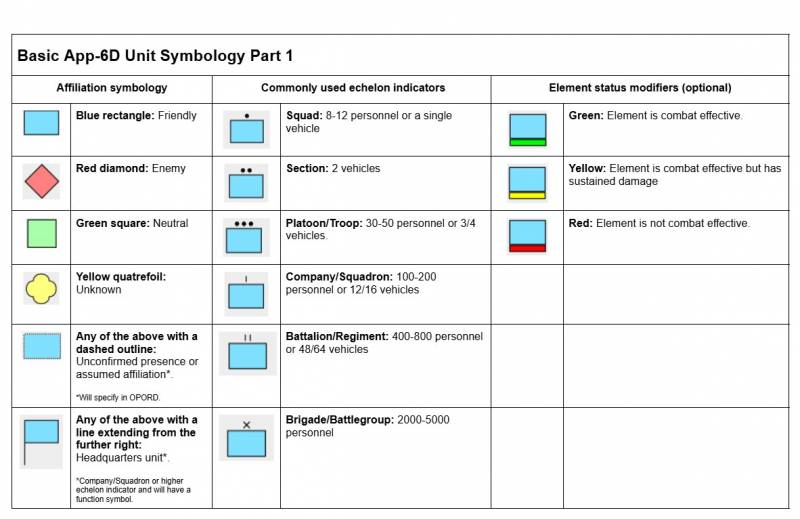
Image
FM/BI-1513 - APP-06 (MIL-STD-2525D) symbology part 1
Image
A guide of basic NATO-standard APP-06 symbols used to mark units, equipment, and tactical functions on maps.

Above: A guide of basic NATO-standard APP-06 symbols used to mark units, equipment, and tactical functions on maps.

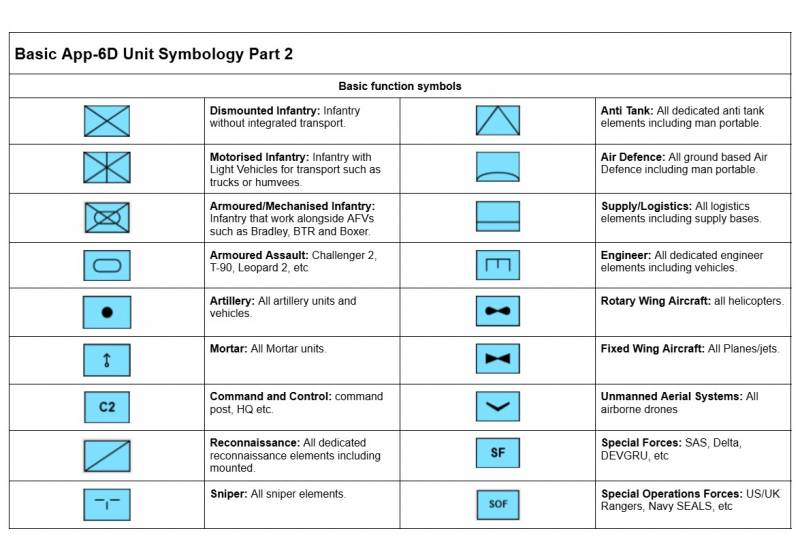
Image
FM/BI-1514 - APP-06 (MIL-STD-2525D) symbology part 2
Image
A guide of basic NATO-standard APP-06 symbols used to mark units, equipment, and tactical functions on maps.

Above: A guide of basic NATO-standard APP-06 symbols used to mark units, equipment, and tactical functions on maps.

FM/BS-1487 - Recognise basic APP-06 symbols on a map
  • Identify unit size, type, and function from symbols.
  • Distinguish friendly, enemy, neutral, and unknown forces by colour.
  • Understand status indicators such as readiness or engagement. 
FM/BS-1488 - Apply the correct APP-06 basic symbols
  • Select appropriate symbols for unit type and size.
  • Use correct colour coding for affiliation.
  • Place symbols in correct positions and maintain clarity on overlays and briefs. 

FM/G334 - Control measures

FM/BG-1489 - What are control measures?

Control measures are tools used to organize, coordinate, and manage forces during an operation.

They help commanders and units:

  • Maintain alignment and spacing
  • Synchronize movement, fires, and support
  • Define boundaries, objectives, and responsibilities
  • Prevent fratricide or confusion
FM/BG-1524 - Sectors

What a Sector Is

A sector is a designated area of responsibility within a town or urban objective, assigned to a squad or team for clearance.

Sectors help:

  • Divide complex urban areas into manageable portions
  • Maintain control and accountability
  • Coordinate movement, fires, and support

Sectors should be sensible, clear, and easy to reference.

Best Practices

  • Keep Sectors Manageable
    • Each sector should be sized so the assigned team can clear it efficiently without overextension.
    • Avoid overly large or irregular sectors that complicate coordination.
  • Use a Simple Naming System
    • Standardize names using a grid-like system: A1, A2, B1, B2, etc.
    • Rows and columns help adjacent units easily identify boundaries.
    • Avoid complicated or inconsistent names.
  • Align Sectors with Terrain
    • Use streets, canals, ridgelines, or major buildings to define borders.
    • Physical features make sectors easier to recognize during movement and coordination.
  • Assign Responsibility Clearly
    • Each sector must have an assigned element responsible for clearing and reporting progress.
    • Ensure overlapping coverage at boundaries is minimized to prevent gaps or duplication.
  • Coordinate Adjacent Sectors
    • Establish coordination points at intersections or key terrain features.
    • Adjacent teams should maintain visual or radio contact when possible.

Communication

Report progress by sector:

  • “1-1 cleared Sector A2.”
  • “Team Bravo securing Sector B1.”

Use sector names for directing support, fires, or follow-on movement.

Example sectors for a town objective

Above: Example sectors for a town objective

FM/BG-1525 - Objective box

What an Objective Box Is

An Objective Box (OB) is a clearly defined area representing the full extent of an objective, such as an entire town, village, or urban complex.

  • It defines the boundaries of the objective.
  • It ensures all units understand the area requiring clearance.
  • Within the OB, the area can be subdivided into smaller sectors for individual squads or teams.

Best Practices

  • Anchor to Terrain
    • Use roads, rivers, canals, ridgelines, or urban landmarks to mark the OB’s corners.
    • Clearly recognizable features make coordination and orientation easier.
  • Size Appropriately
    • Cover the entire objective to prevent missed areas.
    • Avoid making it so large that it becomes unmanageable for assigned forces.
  • Subdivide into Sectors
  • Coordinate Support
    • Use the OB as a reference for fire support, CAS, and logistics.
    • Synchronized actions are easier when all elements reference the same boundaries.

Communication

Reference the OB in orders and reports:

  • “1st Platoon clearing Objective Box Alpha, Sector A2.”
  • “All elements secure Objective Box Bravo as per orders.”
Example objective box for a town objective

Above: Example objective box for a town objective

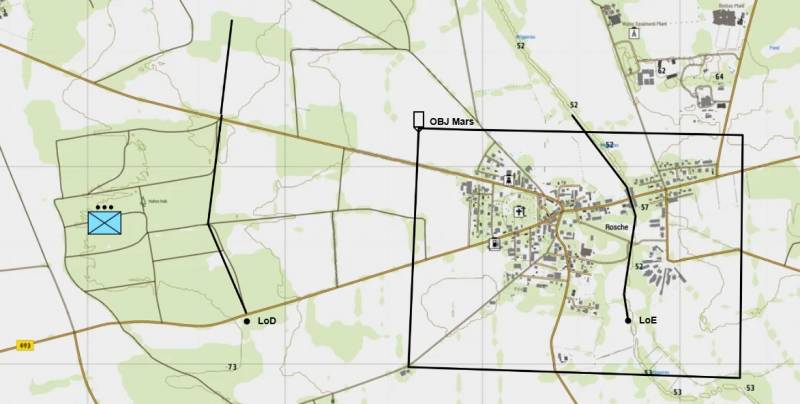
FM/BG-1522 - Line of departure (LoD)

What a Line of Departure Is

  • A Line of Departure (LoD) is the designated line where an assault or advance begins.
  • It signals the transition from preparation or assembly to movement or attack.

The LoD is a control measure, not an objective. Crossing it initiates the operation.

When to Use

Most effective in:

  • Deliberate assaults
  • Platoon- or company-level attacks
  • Coordinated multi-element movements

Generally unnecessary for small patrols or spontaneous actions.

Best Practices

  • Anchor to recognizable terrain (road, ridgeline, tree line, or urban feature).
  • Clearly define who crosses first and in what order.
  • Ensure all support (fires, logistics, follow-on elements) is prepared before crossing.
  • Tie crossing to a trigger (e.g., H-Hour or command order).

Communication

Keep reports concise:

  • “1-1 crossing LoD.”
  • “All elements set on LoD.”
Example Line of departure location.

Above: Example Line of departure location.

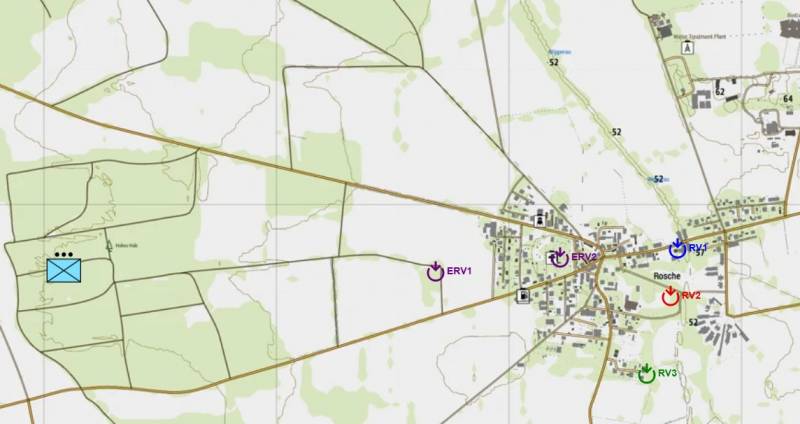
FM/BG-1523 - Rendezvous (RVs) and Emergency Rendezvous (ERVs)

Definitions

  • RV (Rendezvous):
    • A planned link-up point where elements meet during movement or prior to execution.
  • ERV (Emergency Rendezvous):
    • A pre-designated rally point used if elements become separated, break contact, or lose communication.
  • FRV (Final Rendezvous):
    • The last designated assembly point immediately prior to initiating an attack. It is used to consolidate all assault elements, confirm final readiness, and complete last-minute coordination before crossing the line of departure or beginning the final assault phase.

When to Use

  • RVs can be used in all operations.
  • ERVs are used when elements become separated or C2 is degraded.
  • FRVs are used specifically during offensive operations as the final consolidation point before execution of an attack.

Best Practices

  • Anchor to recognizable terrain.
    • Use intersections, buildings, terrain features, or distinct map references.
  • Keep locations practical.
    • Avoid exposed or tactically unsound areas.
  • Assign purpose clearly.
    • RV: Planned link-up during movement
    • ERV: Emergency regroup point
    • FRV: Final consolidation prior to assault
  • Limit quantity.
    • Over-designating rendezvous points causes confusion.

Execution Considerations

  • At an RV:
    • Confirm accountability
    • Conduct quick coordination
    • Adjust plan if required
    • Conduct medical and/or resupply
  • At an ERV:
    • Establish security
    • Rebuild command and control
    • Await further direction
  • At an FRV:
    • Conduct final accountability of assault elements
    • Confirm weapons, ammunition, and readiness status
    • Rehearse or confirm assault plan and timing
    • Synchronise final fire support or enabling assets
    • Issue final go/no-go confirmation before execution

Communication

Use concise reporting:

  • “1-1 set at RV.”
  • “All elements at FRV.”
  • “Breaking contact to ERV.”
Example RVs for town objective.

Above: Example RVs for town objective.

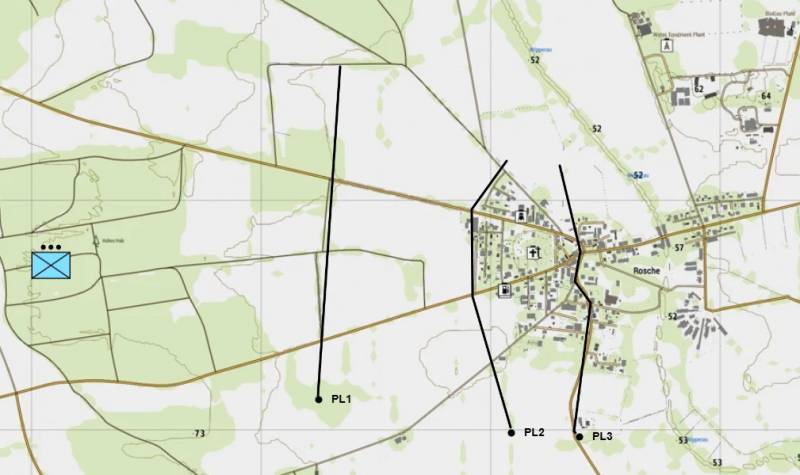
FM/BG-1520 - Phase lines (PLs)

What a Phase Line Is

A Phase Line (PL) (sometimes known as Report Line) is a named control measure drawn across the area of operations to assist with coordination and synchronization.

PLs are used to regulate:

  • Tempo of maneuver
  • Fire support shift/lift
  • Movement of follow-on elements
  • Engagement or fallback triggers

A Phase Line is not an objective or a mandatory halt line unless specifically stated.

Planning test:
If crossing the PL does not trigger an action or report, it likely does not need to exist.

When to Use Phase Lines

Most effective in deliberate, structured operations such as:

  • Platoon- or company-level assaults
  • Mechanized or multi-element manoeuvre
  • Fire support integration
  • Layered defensive plans

They are generally unnecessary for small, fluid, squad-only actions.

Best Practices

  • Anchor to terrain: 
    • Use recognizable features (roads, ridgelines, rivers, major streets).
  • Limit quantity:
    • Use only what is required to control tempo or fires.
    • Too many PLs create clutter and unnecessary reporting.
  • Tie to action:
    • Crossing a PL should trigger something:
      • Shift/lift fires
      • Commit follow-on elements
      • Authorize engagement
      • Execute fallback
      • a halt to maintain cohesion with other elements
  • Align to the axis of advance:
    • Draw PLs perpendicular to movement to clearly show progression.

Common Applications

  • Offense:
    • Control tempo and fire shifts during assaults.
  • Movement:
    • Define bounds during controlled advances.
  • Fire Support:
    • Establish fire limits or lift points.
  • Defence:
    • Set engagement triggers or fallback criteria.

Naming and Communication

Use one consistent naming convention (e.g., ALPHA / BRAVO / CHARLIE, GOLD / SILVER / BRONZE, 1 / 2 / 3).

Keep reports concise:

  • “1-1 at PL ALPHA.”
  • “2-1 crossing PL BRAVO.”
  • “All elements set at PL CHARLIE.”
Example phase lines for a town objective.

Above: Example phase lines for a town objective.

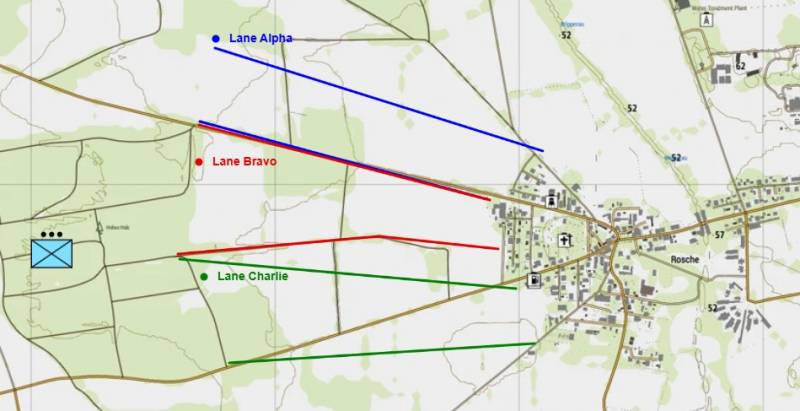
FM/BG-1526 - Boundaries and attack lanes

What Boundaries and Lanes Are

  • Boundaries are control measures that separate adjacent units’ areas of responsibility during movement or assault.
  • Lanes are assigned corridors within which a unit advances or moves.

They are used to:

  • Prevent friendly collisions or overlapping fields of fire
  • Maintain alignment and direction of advance
  • Organize multiple elements moving along the same axis

Boundaries define limits laterally, while lanes define the path forward.

Best Practices

  • Anchor to Terrain
    • Use streets, ridgelines, rivers, or other clear features to define lateral limits.
    • Lanes should follow easily navigable routes (roads, alleys, or trails).
  • Keep Dimensions Manageable
    • Boundaries: wide enough for safety but narrow enough to prevent drift.
    • Lanes: allow movement without congestion, obstacles, or crossfire.
  • Assign Responsibility
    • Each element knows which lane or side of the boundary they occupy.
    • Overlaps only at designated coordination points.
  • Coordinate Fires and Movement
    • Use boundaries to prevent friendly fire.
    • Ensure support elements respect the lateral limits.

Naming and Communication

Name boundaries and lanes clearly (e.g., Lane 1, Lane 2; Boundary RED, Boundary BLUE).

Report positions and movements using the assigned lane/boundary:

  • “1-1 advancing Lane 2.”
  • “Squad Bravo holding Boundary RED.”
Example attack lanes for a town objective.

Above: Example attack lanes for a town objective.

FM/BG-1521 - Limit of exploitation (LoE)

What a Limit of Exploitation Is

A Limit of Exploitation (LoE) defines the maximum depth an attacking element may advance.

It is used to prevent:

  • Overextension
  • Loss of mutual support
  • Collision with adjacent units
  • Advancing beyond sustainment

An LoE is a control boundary, not an objective.

When to Use

Most effective in:

  • Deliberate assaults
  • Mechanized breakthroughs
  • Multi-element attacks
  • Operations with adjacent units

Generally unnecessary for small, short-duration missions.

Best Practices

  • Anchor to clear terrain when possible (road, river, ridgeline).
  • State what happens at the LoE (halt, hold, or await orders).
  • Require authorization before advancing beyond it.

The LoE should control depth and maintain cohesion without slowing momentum.

Communication

Keep reporting simple:

  • “1-1 at LoE.”
  • “Objective secure, holding at LoE.”

Movement beyond the LoE should be deliberate and directed.

Example Limit of Exploitation for a town objective.

Above: Example Limit of Exploitation for a town objective.

Image
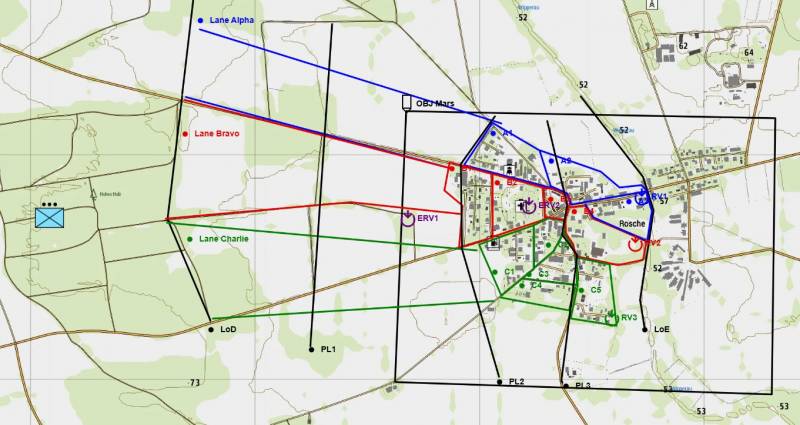
FM/BI-1527 - Worked example of control measures
Image
A full worked example of control measures for a town objective.

Above: A full worked example of control measures for a town objective.

FM/BS-1490 - Interpret friendly control measures
  • Identify phase lines, boundaries, sectors, and objective boxes on mission maps.
  • Plan fire team or squad movement to remain within assigned sectors, lanes, and limits of exploitation.
  • Deconflict actions to prevent overlap, friendly collisions, or breaches of assigned boundaries.
  • Report positions and status at designated rendezvous points (RV, FRV, ERV) or sector boundaries.
This page generated 2.06MB in 0.7041 seconds.