FM/BG-627.V1.03 - ATragMX: moving targets
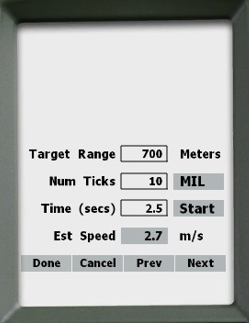
The ATragMX offers a time expedient and field-practical tool to accurately eliminate moving targets, even when target speed is unknown. To open the speed estimation tool, navigate to:
- Options > Target Speed Est
- Enter range in “Target Range” box
Decide upon a number of MRADs to time the target against.
- Enter this number in the “Num Ticks” box.
- Ensure tick units are set to "MIL".
- Time the target movement by pressing the “Start” button.
- Press “Stop” when the target has travelled the decided number of MRADs.
- Press “Done” to auto-populate target speed.
- The final firing solution will be automatically updated.
Tip: This tool is best utilized in a team context, one observing target movement and calling “start/stop”, and the other working the ATragMX.

Above: ATragMX Speed Estimation screen