Vehicles - Unmanned systems - UNITAF Force Manual (FM)


FM/C78 - Vehicles - Unmanned systems
The FM outlines our core skills, policies and guides to ensure every member stands ready for the mission ahead.


FM/G368 - UAS fundamentals

FM/BG-1644 - Common unmanned systems acronyms and definitions

This guide provides commonly used terminology for unmanned and remotely piloted systems.

  • RPV - Remotely Piloted Vehicle
    • Catch all term, includes UAVs, UGVs, USVs, and UUVs.
  • UAV - Unmanned Aerial Vehicle
    • Any aerial vehicle capable of autonomous or remote operation.
  • UGV - Unmanned Ground Vehicle
    • Any ground-based vehicle capable of autonomous or remote operation.
  • USV - Unmanned Surface Vehicle
    • Any surface-level aquatic vehicle capable of autonomous or remote operation.
  • UUV - Unmanned Underwater Vehicle
    • Any underwater vehicle capable of autonomous or remote operation.
  • U[X]S or RPS - Unmanned [Type] System / Remotely Piloted System
    • Refers to the full operational network supporting a vehicle, including pilot, communications links, controller, and launch infrastructure.
  • sUAV - Small Unmanned Aerial Vehicle
    • Small, often hand-launched UAVs with limited range and endurance. Commonly includes modified commercial quadcopters or similar platforms.
  • CUAS - Counter-UAS
    • Actions, equipment, and systems used to detect, deter, defeat, or defend against UAS threats.
FM/G366 - Operating the UAV terminal

FM/BG-1650 - RPV terminal systems and interface awareness

The RPV terminal provides command, control, and situational awareness for unmanned platforms. The interface displays map-based platform locations and allows selection via map icons or callsigns. Platform feeds and controls may vary based on vehicle capabilities.

Telemetry data provides operational indicators but should not be treated as absolute system health data.

Common telemetry fields include:

  • STAT - General platform condition.
  • FUEL - Remaining fuel.
  • WPN - Weapons and ammunition status.
  • POS - Grid location.
  • AZT - Bearing.
  • SPD - Speed.
  • ALT - Altitude.

Operators should use telemetry to support, not replace, tactical judgment.

FM/BS-1651 - Establish control of RPV through terminal interfaces
  • Access the UAV terminal through the interaction menu.
  • Identify the desired RPV using map icons or callsign selection.
  • Connect terminal control to the selected RPV.
  • Select available pilot or weapon operator seats when applicable.
  • Confirm sensor and telemetry feeds are functioning after connection.
FM/BG-1645 - RPV waypoint types and functions

The TYPE setting determines what an RPV will do upon reaching a waypoint. Selecting the appropriate type allows operators to control movement behaviour, engagement posture, and loiter patterns.

  • MOVE
    • The RPV will move to the waypoint location and attempt to remain stationary.
    • If it cannot remain stationary, it will orbit the waypoint.
  • DESTROY
    • The RPV will attempt to destroy the targeted entity.
      • This method is not highly reliable since UAV terminals cannot directly target entities with high precision.
  • SEEK AND DESTROY
    • The RPV will attempt to visually detect enemies near the waypoint and engage according to its WCS.
    • This method is not consistently reliable due to detection limitations.
  • HOLD
    • The RPV will move to the waypoint and remain in position, orbiting if necessary.
      • Useful for staging operations since additional waypoints can be prepared without forcing immediate movement.
    • To release HOLD, delete or change the waypoint type to MOVE.
  • SENTRY
    • The RPV will move to the waypoint and hold position.
    • The RPV will attempt to detect and identify unknown units, then determine friendly or hostile status before continuing.
    • May engage hostile units while moving to the next waypoint.
  • GUARD
    • Not usable in most cases, as it requires editor-set triggers to function.
  • SUPPORT
    • The RPV will move to the waypoint and loiter until a unit requests support through the in-game support system.
    • Use is generally limited.
  • CYCLE
    • The RPV will move to the nearest MOVE waypoint associated with the CYCLE waypoint and repeat the waypoint loop.
    • Useful for establishing patrol routes with multiple waypoints.
    • The cycle continues until the CYCLE waypoint is removed or modified.
  • LOITER
    • The RPV will orbit the waypoint location.
    • Loiter radius can be adjusted through the context menu after selection.
  • LAND
    • The RPV will attempt to land at the selected location.
    • Fixed-wing RPVs require a recognized airstrip.
    • Rotary-wing RPVs can land in open areas but are more reliable when using designated landing zones or helipads.
FM/BG-1646 - RPV behaviour and weapons control states

The BEHAVIOR setting controls the RPV’s Weapons Control State (WCS) and determines how it will respond to potential targets. It is recommended to set RPV WCS to NEVER FIRE to ensure all weapons employment is controlled by a human operator. 

WCS Options

  • NEVER FIRE
    • The RPV will not fire weapons under any circumstances.
    • Requires human authorization for all weapon employment.
  • HOLD FIRE
    • The RPV will not engage targets unless explicitly ordered.
    • Provides strict control over weapon release.
  • HOLD FIRE, ENGAGE AT WILL
    • The RPV may only engage targets that directly threaten it or friendly forces.
    • Provides limited autonomous defence capability.
  • OPEN FIRE
    • The RPV may engage targets without waiting for additional authorization.
    • Increases responsiveness but reduces operator control.
  • OPEN FIRE, ENGAGE AT WILL
    • The RPV may freely engage targets within WCS and threat parameters.
    • Provides maximum autonomy but carries the highest risk of misidentification or unintended engagement.
FM/BG-1647 - RPV altitude control

The ALTITUDE setting determines the height a UAV will attempt to maintain while moving toward a waypoint. Altitude cannot typically be adjusted at the current location, so altitude changes usually require setting a new waypoint or manually controlling the UAV.

Selecting appropriate altitude improves survivability and mission effectiveness. Higher altitudes are generally sufficient to reduce the effectiveness of small arms fire against small UAVs (sUAVs), while still allowing for effective surveillance and navigation.

Altitude selection should balance:

  • Threat exposure
  • Sensor effectiveness
  • Mission requirements
  • Airspace deconfliction with friendly assets
FM/BS-1652 - Control RPV movement and tasking via terminal
  • Create waypoints using map controls.
  • Modify waypoint behaviour using the waypoint context menu.
  • Use waypoint tasking to direct RPV movement and mission behaviour.
  • Adjust waypoint parameters as mission conditions change.
FM/BG-1648 - RPV sensor awareness and ISR interpretation

RPV sensor systems provide situational awareness for ISR and targeting support. Operators should focus on interpreting sensor information rather than platform-specific interface layouts.

Displays typically present:

  • Left side: Speed, altitude, camera angle, grid location, and time.
  • Centre: Bearing, camera direction, target range, crosshair alignment, and magnification.
  • Right side: Target grid and range data.

Common imaging modes include visual, night vision, and thermal (white-hot or black-hot).

Auxiliary sensors or AI-assisted detection systems may display contact markers within the sensor field of view. Detection reliability may vary based on platform capability and environmental conditions.

Map and navigation overlays may be used to maintain spatial awareness and confirm platform orientation.

FM/BS-1649 - Operate RPV turret and sensor controls
  • Adjust zoom using platform zoom controls.
  • Switch imaging modes using platform imaging controls.
  • Lock or unlock targets using targeting controls.
  • Slew turret to map or grid locations using map or grid input functions.
  • Place map markers to report contacts using appropriate communication channels.
  • Measure distance and azimuth using two-point measurement tools.
  • Maintain visual tracking of targets when conducting ISR or fire support observation.
FM/BP-1654 - AI weapon release

All RPV weapon releases must be directly authorized and controlled by a human operator unless explicitly authorized otherwise through an OPORD or Field Leader (FL).

This policy is mandatory and applies to all RPV combat operations. Autonomous or AI-directed weapon releases are prohibited unless specifically approved through formal operational orders or command authorization channels.

FM/G379 - Operating sUAS

FM/BS-1727 - Manual fly a sUAS

Maintain stable and controlled sUAS flight through accurate manipulation of heading, altitude, and hover control.

  • Change heading smoothly and accurately
  • Maintain assigned heading during flight
  • Change altitude in a controlled manner
  • Maintain stable altitude during movement or stationary flight
  • Establish and maintain a stable hover
  • Correct drift during hover operations
  • Maintain aircraft orientation during manoeuvring
  • Apply smooth control inputs to prevent overcorrection
  • Retain control during low-speed and stationary flight conditions
FM/BS-1728 - Dogleg while beginning an sUAS flight

Reduce the likelihood of enemy triangulation and identification of sUAS operating positions during departure and recovery.

  • Depart operating positions on a non-direct heading
  • Avoid flying directly toward or away from operating positions
  • Create lateral separation from operating positions before turning onto final flight path
  • Conduct final approach from offset directions when returning to operating positions
  • Use terrain, structures, or distance to break visual tracking where possible
  • Delay establishment of a direct flight line to the operating position until outside likely enemy observation
FM/BS-1729 - Mitigate signal and detection risks during sUAS operations

Maintain reliable sUAS control while reducing the risk of enemy detection, interception, or triangulation during flight operations.

  • Identify terrain features that may interfere with signal transmission or reception
  • Maintain awareness of signal degradation caused by terrain, structures, vegetation, or elevation changes
  • Adjust aircraft position, altitude, or operator location to maintain signal quality
  • Monitor for signs of signal instability or degradation during flight
  • Maintain awareness that enemy SIGINT assets may detect sUAS and controller emissions
  • Minimize unnecessary transmission exposure during operations
  • Position operators and equipment to reduce likelihood of enemy detection
  • Use terrain and concealment to reduce signature exposure where possible
  • Limit predictable flight patterns and operating locations
  • Apply appropriate risk mitigation measures during launch, flight, and recovery operations
FM/BS-1730 - Operate an FPV attack sUAS

Maintain controlled FPV sUAS flight while identifying, approaching, and impacting infantry or vehicle targets, ensuring obstacle avoidance throughout the engagement.

  • Maintain continuous awareness of flight path, obstacles, and surrounding environment
  • Identify vehicle or infantry target
  • Approach target using an appropriate route and speed, considering detection, obstacles, and friendly positions
  • Maintain control to avoid collisions with terrain, structures, or other obstacles during approach
  • Balance target tracking with obstacle avoidance at all times
  • Adjust flight inputs smoothly to maintain stable control during engagement
  • Maintain aircraft stability during high-speed or dynamic manoeuvring
  • Impact target at an effective location
FM/BS-1731 - Operate a dropper attack sUAS

Maintain controlled sUAS flight while identifying infantry targets and delivering dropped munitions to achieve effective impact.

  • Maintain stable control of sUAS during munition carriage and flight
  • Identify infantry target
  • Approach target using an appropriate route and speed, considering detection, obstacles, and friendly positions
  • Maintain aircraft stability while positioning over or near target area for munition release
  • Release munition at an effective point to achieve intended impact
  • Adjust flight inputs smoothly during approach, release, and egress phases
  • Maintain situational awareness of obstacles and environment throughout engagement
FM/BS-1732 - Direct an FPV attack

Enable effective engagement of targets through clear communication, appropriate munition selection, coordination with friendly elements, and post-engagement assessment.

  • Effectively communicate target type, identity, position, and disposition to attack operators to ensure effective engagement
  • Select appropriate munition for engagement
  • Coordinate with friendly elements in the area
  • Conduct BDA and reengage as required
FM/BS-1733 - Select an appropriate team operating point

Establish an operating position that reduces enemy detection risk while supporting reliable sUAS flight and control.

  • Select a position that offers at least concealment, and ideally cover, from presumed enemy positions
  • Ensure position is concealed from above to prevent detection by enemy UAS
  • Analyse position to ensure appropriate terrain features for flight and signal

FM/G367 - Counter UAS

FM/BG-1637 - Air defense warning conditions (ADW)

Air defence warning conditions (ADW) are used to posture units based on the assessed threat of aerial attack. They provide a scalable readiness framework aligned to current air threats.

ADW Levels:

  • ADW Red: Hostile aircraft or missile attack is imminent or in progress.
  • ADW Yellow: Hostile aircraft or missile attack is probable.
  • ADW White: Hostile aircraft or missile attack is improbable.

Subordinate leaders may increase the ADW level within their assigned area if local conditions warrant it. However, they may not reduce it below the general ADW established by higher command.

For example, if a platoon establishes ADW Yellow for the AO and a squad observes a hostile UAV loitering, the squad leader may elevate to ADW Red. Once the threat is mitigated, the squad may return to ADW Yellow, but may not reduce to ADW White unless the higher-level ADW changes.

FM/BS-1638 - Implement air defense warning conditions
  • Identify the current general ADW for the AO.
  • Interpret ADW levels:
    • Red: Attack imminent or in progress.
    • Yellow: Attack probable.
    • White: Attack improbable.
  • Assess local aerial threat indicators.
  • Elevate ADW for the assigned element when conditions warrant.
    • Do not reduce ADW below the general ADW set by higher command.
  • Communicate ADW changes clearly.
  • Return elevated ADW to the general level once the threat is mitigated.
FM/BG-1639 - CUAS weapon control status

Weapons Control Status (WCS) follows the framework established in FM/BG-335 - Understanding weapon control states. However, leaders may set a different WCS for UAS than the general WCS when the threat environment requires it.

For example, the general WCS may be Orange for conventional targets. If FPV kamikaze UAVs pose an immediate risk, a leader may establish UAS WCS Green to enable faster engagement of aerial threats.

Counter UAS WCS may be more permissive than the general WCS due to the differing risk balance:

  • A false negative (not engaging a hostile UAV) carries high operational risk.
  • A false positive generally carries lower cost than misidentifying a ground target.

This allows responsive UAS threat mitigation while maintaining overall fire control discipline.

FM/BS-1640 - Respond to UAS using the DIDE sequence
  • Detect
    • Maintain awareness for visual, thermal, or auditory indicators of UAS presence.
    • Announce detection clearly to the element.
  • Identify
    • Confirm the object as a UAV.
    • Determine type, behavior, and threat profile where possible.
  • Decide
    • Determine whether to engage based on:
      • Risk of drawing attention if not yet detected by the UAV.
      • Risk of friendly fire.
      • Risk posed to friendly forces.
      • Viability of engagement given available skill and equipment.
    • Determine how to engage (physical or non-physical method).
  • Engage
    • Employ the selected method:
      • Physical: Explosive munitions or small arms to destroy or damage the UAV.
      • Non-Physical: GPS or radio jamming to disrupt, disable, or control the UAV signal.
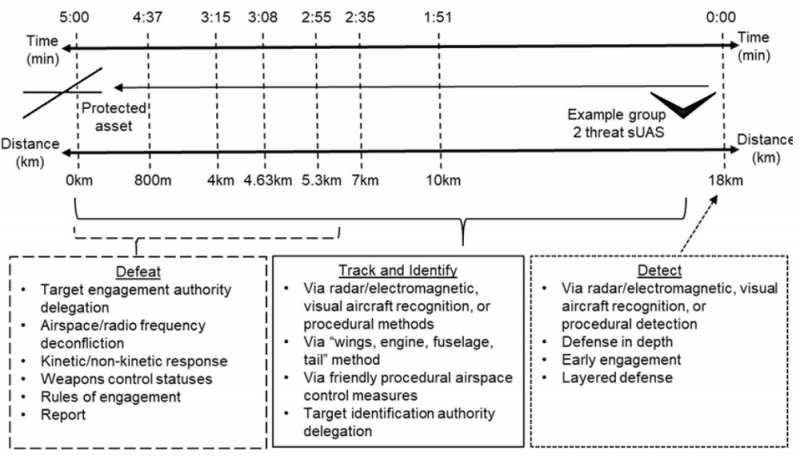
Timeline of Counter UAS actions

Above: Timeline of Counter UAS actions

FM/BG-1642 - Detecting UAS

Unmanned Aerial Systems (UAS) may be detected using methods similar to manned aircraft detection; however, small UAS (sUAS) may not appear on conventional air defence radar and can be difficult to detect due to their small size and low acoustic signature.

Air Guards are designated personnel responsible for monitoring for aerial threats near their unit and providing early warning. If equipped, Air Guards may also operate counter-UAS (C-UAS) equipment.

Visual Detection

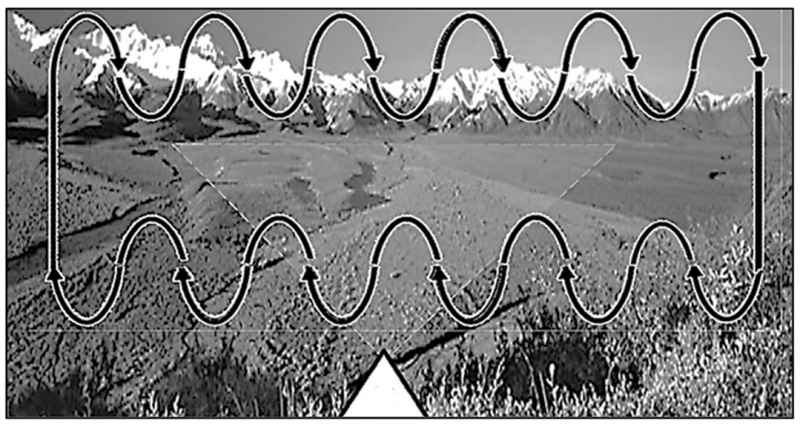
  • Conduct visual scanning using a vertical scan pattern.
  • Monitor approximately 20 degrees above and below the horizon.
  • Maintain continuous observation of the assigned sector.

Identification Methods

  • UAS may be operated by friendly or enemy forces. Two primary identification methods may be used:
    • Positive Identification: Uses IFF systems, visual recognition, or electronic support systems.
    • Procedural Identification: When positive identification is not possible, describe physical characteristics such as wingspan, rotor configuration, size, payload, and markings to assist leadership decision-making.
Visual representation of how to scan an area for UAS

Above: Visual representation of how to scan an area for UAS

FM/BS-1641 - Report UAS contacts
  • Upon detecting a UAS, immediately alert the element using FM/BS-40 - Give a structured Contact Report
  • Continue tracking the UAS until a decision is made to engage or not engage.
  • Include the following information when reporting:
    • Group (small or large) of the UAV
    • Visible payload
    • Direction of travel
  • When able, follow up the initial contact information using SALUTE reporting format:
    • Size: How big was the UAS?
    • Activity: What was the UAS doing?
    • Location: Where was the UAS?
    • Unit/Uniform: Was there any identifying marks?
    • Time Observed: When did you see it?
    • Equipment: Has the UAS got any visible weapons/payload/sensors?
FM/BG-1643 - UAS deconfliction and identification

With Weapons Control Status (WCS) for UAS being generally more permissive than for conventional contacts due to the higher risk posed by false negatives compared to false positives. The objective is to prevent both friendly fire incidents and undetected hostile UAS through positive identification (PID) and airspace deconfliction.

Fixed-wing UAS are often easier to identify due to larger profiles, markings, or insignia. Small UAS (sUAS) may be difficult to identify due to size, speed, range, and use by multiple forces without clear markings.

Upon detecting an unknown UAS:

  • FM/BS-1641 - Report UAS contacts immediately up the chain of command.
  • Maintain visual or sensor tracking.
  • Treat the contact as potentially hostile until identification is confirmed.
  • Prepare defensive or engagement actions if authorized.

To reduce misidentification risk, UAS operators should proactively announce their presence when operating near friendly elements. Clear communication reduces friendly fire risk and improves airspace awareness.

FM/G369 - Reacting to UAVs

FM/BG-1655 - Survivability framework against RPS

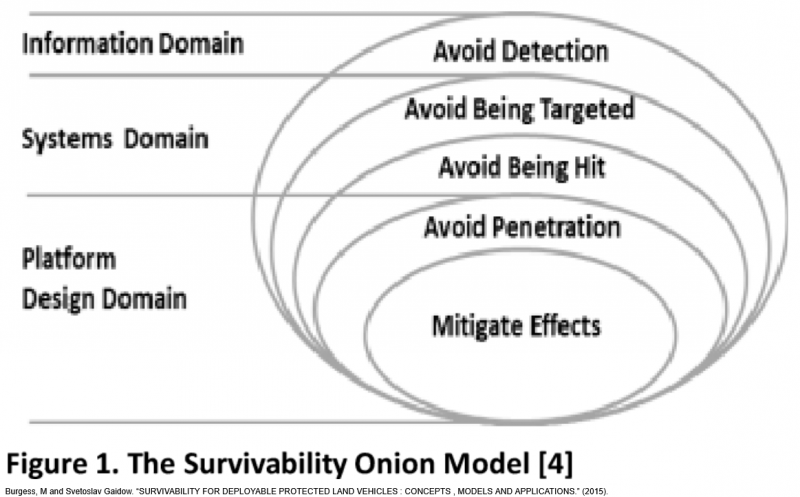
The survivability framework provides a structured approach to countering RPS threats by layering responses:

  • Preventative Reactions focus on avoiding detection and targeting before an immediate threat is identified.
  • Defensive Reactions focus on reducing the likelihood or impact of a strike once a threat exists.
  • Offensive Reactions involve actively disrupting or destroying the RPS platform when feasible.

Preventative measures should be the default posture. Defensive and offensive reactions are employed based on threat confirmation, capability, and leadership assessment.

The survivability onion

Above: The survivability onion

FM/BG-1656 - Preventative reactions to UAV threats

UAV detection is difficult to avoid. Units should assume they are under observation at all times.

To reduce detection, identification, and tracking:

  • Use camouflage, concealment, and terrain masking.
  • Minimize movement in exposed areas.
  • Avoid skyline positioning and predictable patterns.
  • Reduce light, noise, and thermal signature where possible.

Preventative measures aim to delay or complicate enemy targeting decisions.

FM/BG-1657 - Defensive reactions to UAV threats

When a UAV threat is identified, defensive measures may supersede stealth depending on the situation.

Leaders must balance low observability with passive defence systems such as jammers.

Common defensive measures include:

Dispersion

  • Maintain spacing between personnel and vehicles.
  • Reduce multi-target strike effectiveness.

Displacement

  • Relocate if actively targeted or used as ISR reference.
  • Balance movement against loss of fortified or mission-critical positions.

Fortification

  • Use trenches, sandbags, and covered positions to reduce fragmentation effects.
  • Avoid single-entry choke points where possible.

Netting

  • Employ overhead protection where available.
  • Understand its limitations against certain munitions.
FM/BS-1658 - Employ electronic counter-UAS measures
  • Identify active UAV signal frequencies using spectrum tools.
  • Align and maintain directional jamming.
  • Sustain jamming until signal disruption is achieved.
  • Coordinate jamming with unit movement and concealment.
FM/BG-1659 - Kinetic counter-UAS engagement

Offensive reactions involve disrupting or destroying a hostile UAV when stealth or defensive measures are insufficient.

Engage larger UAVs with dedicated air defense systems where available. Use electronic countermeasures when equipped.

Small arms engagement of small UAVs is a last resort. If required:

  • Coordinate volume of fire.
  • Use tracers to adjust.
  • Maintain awareness of ground threats.

Engagement must be balanced against mission priorities, ammunition use, and exposure risk.

FM/G371 - Loitering munitions and FPV UAVs

FM/BS-1682 - Cancel a loitering munition attack run
  • Identify a change in situation
  • Cancel the attack run
FM/BS-1681 - Engage a target with loitering munitions
  • Select appropriate loitering munition variant for the target and use case
  • Use turret camera to observe and track the target
  • Point turret at target and press vehicle target lock
  • Select airburst mode when engaging infantry or exposed targets if required
FM/BS-1680 - Deploy a loitering munition
  • Place launcher tube in a suitable and safe position
  • Deploy the munition from the launcher
  • Take control of the munition using the UAV terminal
FM/BG-1679 - Using switchblade

The Switchblade is a loitering munition used by many NATO and allied forces and available in two variants. It is a disposable UAV designed to loiter over an area and strike designated targets with precision.

  • Switchblade 300 is small and lightweight, allowing multiple units to be carried by a single operator. It has short range and endurance with VIS, NV, and TI imaging and a payload comparable to a 40 mm HEDP grenade, making it suitable for infantry and light vehicles. It can detonate on impact or airburst.
  • Switchblade 600 is a larger variant with longer range and endurance and a payload comparable to a Javelin ATGM, making it suitable for armoured vehicles and heavier targets.

Switchblade munitions are launched from a disposable tube at an elevated angle and typically deployed from covered or rear positions. After launch, the munition loiters over the area and is controlled through a UAV terminal.

Target designation can be performed using automated waypoints or manual targeting. Automated targeting is generally discouraged due to unpredictability and policy restrictions, while manual designation using the turret camera and target lock provides better control and visual confirmation. Once a target is locked, the munition conducts a top down attack and can be cancelled or self destructed if required.

Known issue: Direct targeting through GMs remote control may not function correctly; a UAV terminal should be used for manual designation.

FM/BG-1678 - Loitering munitions

Loitering munitions are a type of UAV designed to loiter around an AO until a target is spotted and designated, allowing faster response than systems that must launch and transit after target acquisition.

They are distinct from other UAS in several ways. Conventional UAVs such as the MQ-9 Reaper are aircraft that deploy munitions, whereas loitering munitions are themselves the weapon. Unlike FPV kamikaze drones which are piloted directly, loitering munitions are generally more independent and guide themselves onto a designated target. They are also not recoverable once launched, making them a single-use strike asset.

Loitering munitions are most useful as a rapid response capability against HVTs or targets of opportunity, where speed and precision are more important than persistence or recovery.

This page generated 1.79MB in 0.1597 seconds.